Automatic app profiles: a deck that follows your Mac
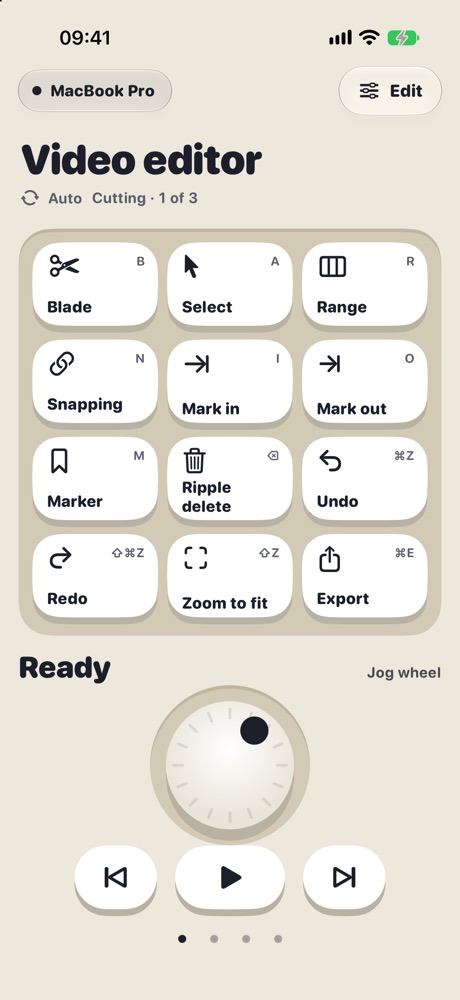
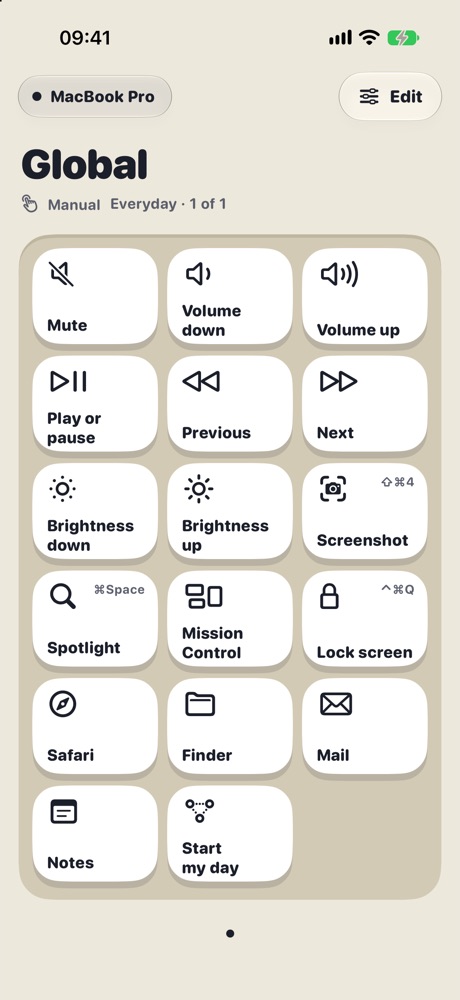
TouchDeck knows which app is in front on your Mac. When you switch to an app that has its own deck, your iPhone or iPad switches to it within a moment. When you leave, it goes back to Global, your everyday keys.
How it works
- TouchDeck for Mac notices when a different app comes to the front.
- It tells your paired iPhone and iPad which app that is.
- If that app has a profile set to Automatic, the deck switches to it; otherwise it shows Global.
Quick app switches are ignored for a moment, so the deck doesn't flicker while you Command-Tab past apps.
Stay in control
- Pick a profile yourself and it stays until you choose Automatic again (shown as Manual)
- Turn automatic switching off for a device in Settings › Profiles
- Each device chooses for itself: your iPhone can follow your apps while your iPad stays on Global
- The Mac's Profiles pane shows which apps switch automatically
Making a profile for an app
Choose From a Mac app and pick the app: TouchDeck reads the keyboard shortcuts from its menus and builds a deck, one page per menu, already set to switch automatically (see automatic shortcut discovery). Or start from a blank page or Everyday Mac and assign the app yourself.
Questions
Which apps can have a profile?
Any Mac app. A profile can match one or more apps by their identifier, and decks built from an app's menus are matched to it automatically.
What shows when the app in front has no profile?
Global, your everyday deck with volume, media, brightness and the apps you use most.
Can my iPhone and iPad switch differently?
Yes. Each device keeps its own decks and its own switching setting, so one can follow your apps while the other stays put.
Does switching need the internet?
No. The Mac tells your devices directly over your Wi-Fi.
Related
- Use your iPad as a Stream Deck for your Mac
- A Stream Deck alternative using the iPhone or iPad you own
- Automatic shortcut discovery: buttons from any Mac app's menus
- A control deck for Mac productivity
- TouchDeck vs Stream Deck
- Compare TouchDeck with Stream Deck Mobile, Touch Portal, Deckboard and BetterTouchTool