Automatic shortcut discovery: buttons from any Mac app's shortcuts
Yes, TouchDeck does this. Pick any app on your Mac and TouchDeck reads the keyboard shortcuts already in its menu bar, then builds a deck of buttons from them, one page per menu. You don't record, type or look up a single shortcut. The deck then switches on by itself whenever that app is in front.
Two different features, and TouchDeck has both
Deck apps for the Mac are often described as “automatic”, but that can mean two separate things. Automatic profile switching changes which deck you see. Automatic shortcut discovery fills the deck for you. Many deck apps switch profiles by app; filling a deck from an app's own shortcuts is rarer, and usually means recording shortcuts one by one or installing a prebuilt profile.
| Automatic profile switching | Automatic shortcut discovery | |
|---|---|---|
| What it does | Changes the deck on your iPhone or iPad when a different app comes to the front on your Mac | Reads the keyboard shortcuts an app already has in its menus and turns them into buttons |
| Answers | Which deck should show right now? | What goes on the deck in the first place? |
| Without it | You switch decks by hand | You record or type every shortcut, or find a prebuilt profile |
| In TouchDeck | Yes, built in | Yes, built in, for any Mac app |
How it works
- Open New profile. On your iPhone or iPad, open Profiles and tap New profile, then choose From a Mac app.
- Pick the app. Choose any app installed on your Mac. If it isn't running, the Mac opens it in the background.
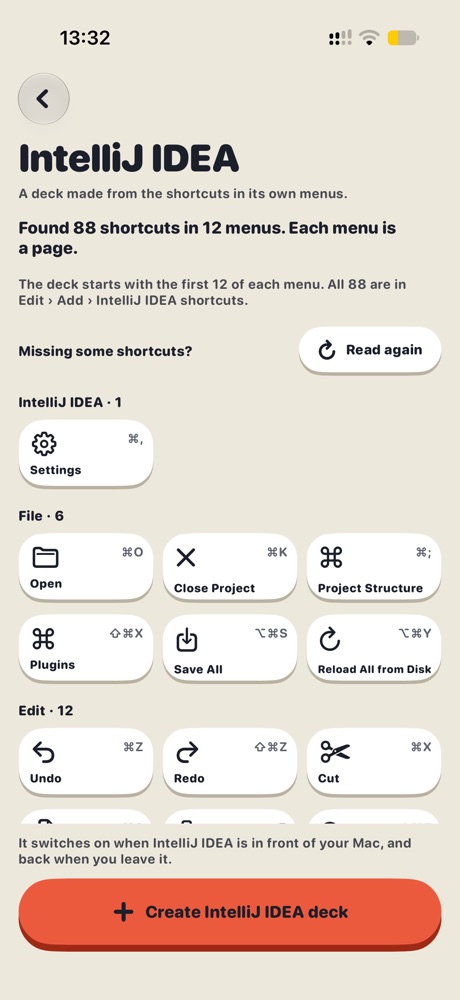
- TouchDeck reads its menus. The Mac reads every keyboard shortcut in the app's menu bar, grouped by menu: for example, 88 shortcuts in 12 menus for IntelliJ IDEA.
- Create the deck. Each menu becomes a page of buttons, already labelled with the command, its icon and its shortcut. The deck switches on when that app is in front.
No catalogue of apps is involved: TouchDeck reads the menus of the app on your Mac, so it works with apps it has never seen, including new versions and your own tools.
What you get
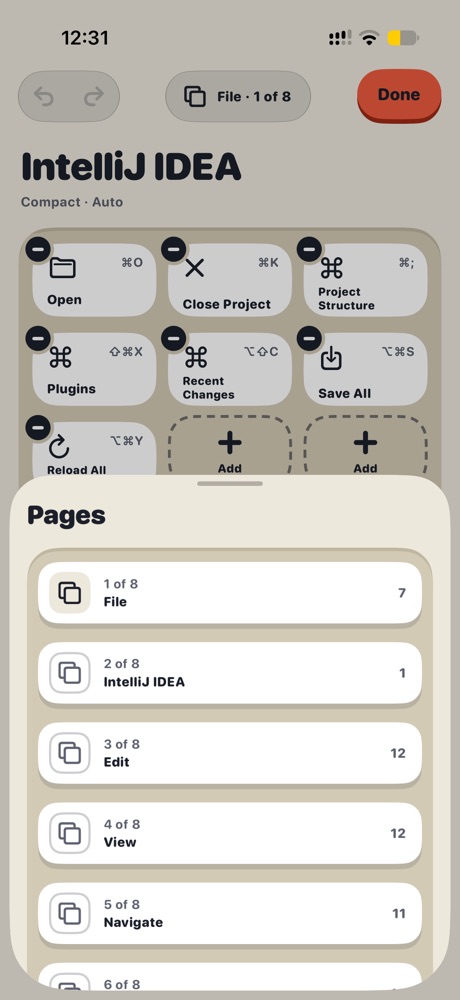
- A page for each menu: File, Edit, View and the rest, up to 12 buttons a page to start
- Every shortcut kept: the full list stays in the editor under Add, so you can add any of them later
- Ready-made buttons: each shows the command name, a matching icon and its key combination, including function keys
- Switches by itself: the new deck is set to Automatic for that app
- Yours to change: move, resize, rename or delete buttons, and mix in dials, sliders and workflows
Good to know
- It reads shortcuts that appear in the app's menu bar. Shortcuts that exist only inside a window, a web page or a game aren't in the menus, so add those yourself with the shortcut recorder
- Some apps change their menus with what you're doing. If a shortcut is missing, tap Read again with the app in the state you use; new shortcuts are added
- The Mac brings the app forward for a moment while reading, then returns to the app you were using
- With TouchDeck for Mac from the Mac App Store, allow menu reading once: Permissions › App menus › Set up. The direct download uses the Accessibility permission it already has
Questions
Can TouchDeck create buttons from an app's existing keyboard shortcuts?
Yes. Choose From a Mac app, pick the app, and TouchDeck reads the shortcuts in its menus and builds a deck from them, one page per menu. No recording or typing.
Is that the same as automatic profile switching?
No. Profile switching changes which deck shows when you change apps. Shortcut discovery creates the buttons. TouchDeck does both: a deck made from an app's menus also switches on when that app is in front.
Which Mac apps does it work with?
Any Mac app with keyboard shortcuts in its menu bar: for example Xcode, IntelliJ IDEA, Visual Studio Code, Safari, Notes, Pages and Keynote. There's no list of supported apps; it reads the app on your Mac.
What if the app isn't open?
TouchDeck for Mac opens it in the background to read its menus.
Does it need the internet or an account?
No. Your iPhone or iPad and your Mac talk directly over your Wi-Fi, and there's no TouchDeck account to create. The optional deck backup uses your own iCloud.
What does it cost?
Free for 7 days, then $3.99 a month or $79.99 once for Lifetime (₹199 or ₹3,999 in India). One plan covers all your iPhones and iPads. The Mac app is free.