TouchDeck vs BetterTouchTool
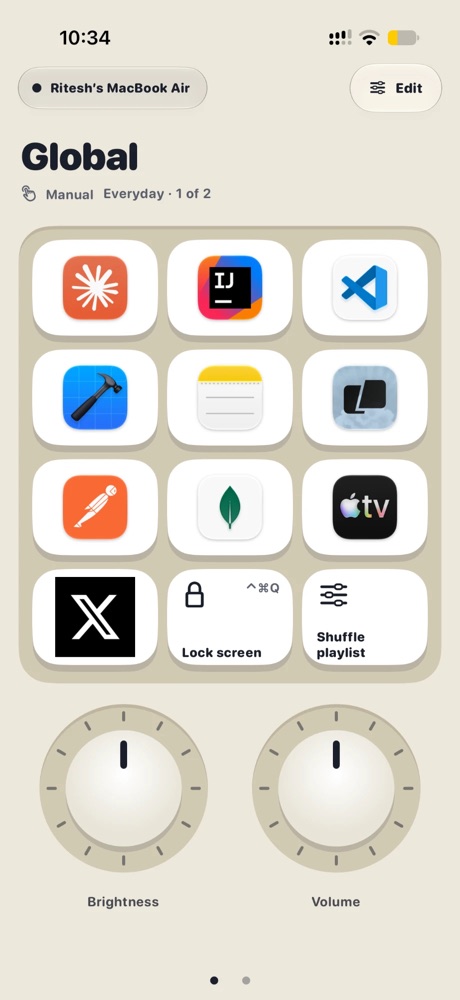
They solve different problems. BetterTouchTool is a deep Mac customisation tool for gestures, the trackpad, mouse, keyboard and windows, with a companion app that can act as a remote. TouchDeck is a ready-made control deck for your iPhone or iPad, with decks from your apps' menus that follow the app in front.
Side by side
| TouchDeck | BetterTouchTool | |
|---|---|---|
| What it is | A control deck on iPhone and iPad for your Mac | A Mac customisation and automation tool, with a remote app |
| Main focus | Keys, dials, sliders and a jog wheel on your device | Gestures, trackpad, mouse, keyboard, windows and more |
| Per-app setups | Built in: the deck follows the app in front | App-specific triggers you configure |
| Decks from an app's menus | Yes, from any Mac app | Not that we could find |
| Setup | Pair with a code, then build a deck from an app in a tap | Very flexible; you build each trigger and action |
| Price | 7-day trial, then monthly or one-time Lifetime | Paid Mac license, also in Setapp |
What TouchDeck does differently
- Automatic app switching, built in: the deck follows the app in front on your Mac with no rules to write
- Decks from native Mac menus: pick any Mac app and TouchDeck reads the shortcuts from its menu bar and builds a deck (how it works)
- Dials, sliders and a jog wheel alongside keys, with haptic clicks on iPhone
- Local Wi-Fi only: your device talks straight to your Mac, encrypted end to end, after a four-digit pairing code
- No account: nothing to sign up for; decks back up to your own iCloud
- Layouts for each screen: iPhone, both screens of iPhone Duo, and every iPad size
When BetterTouchTool is the better pick
- You want to customise trackpad gestures, the mouse, keyboard or window snapping
- You enjoy building detailed automations yourself
- You already own a license and only need occasional remote buttons
Questions
Can I use both together?
Yes. Many people use BetterTouchTool for gestures and windows, and TouchDeck as a deck of keys and dials on their iPhone or iPad.
Can TouchDeck trigger BetterTouchTool actions?
Yes, through keyboard shortcuts: give a BetterTouchTool action a shortcut and put it on a TouchDeck key.
Which is quicker to start with?
TouchDeck: pair once, then choose an app and get a deck of its shortcuts. BetterTouchTool rewards time spent configuring it.
What does TouchDeck cost?
Free for 7 days, then $3.99 a month or $79.99 once for Lifetime (₹199 or ₹3,999 in India). One plan covers all your iPhones and iPads. The Mac app is free.
Related
- Use your iPad as a Stream Deck for your Mac
- A Stream Deck alternative using the iPhone or iPad you own
- Automatic shortcut discovery: buttons from any Mac app's menus
- Automatic app profiles
- A control deck for Mac productivity
- TouchDeck vs Stream Deck
- Compare TouchDeck with Stream Deck Mobile, Touch Portal, Deckboard and BetterTouchTool